Reaching AI Agents from a Phone with Paseo
Paseo turns long-running AI coding agent sessions on a headless machine into something you can watch and drive from your phone, over an end-to-end encrypted relay or a direct connection.
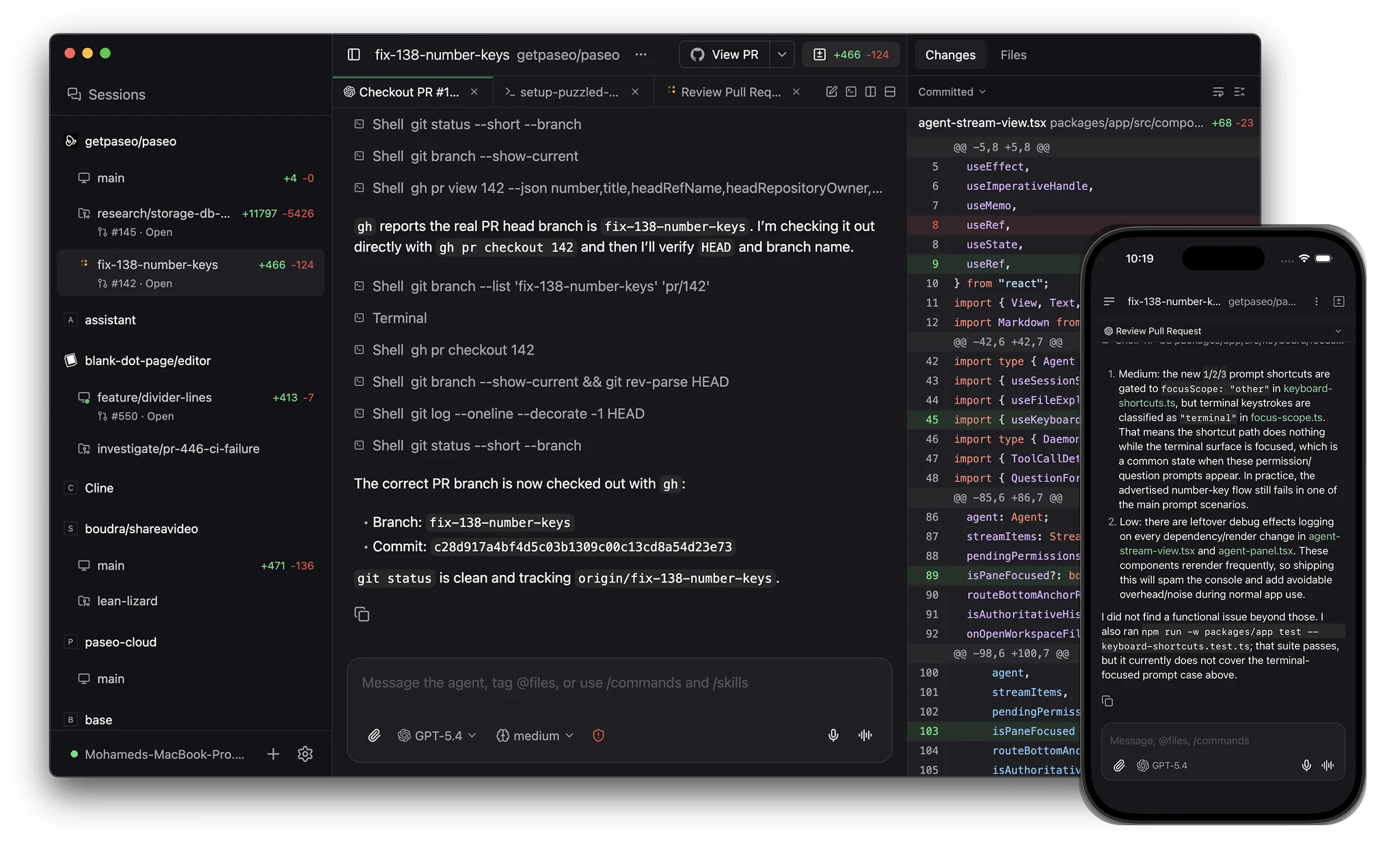
Coding agents like OpenCode, Claude Code, or Codex live inside the terminal of a working machine. The problem shows up when a session runs long — an agent mid-refactor on a headless server — and I am not in front of it. SSH from a phone works, but reading agent output on a small terminal is awkward. Paseo targets exactly that: a daemon managing agents, with mobile, desktop, web, and CLI clients to drive sessions anywhere. It manages agents, does not bundle one: install and authenticate at least one agent CLI (say OpenCode) on the same machine.
Why Paseo
Agents on headless machines have no interface; results only show up if you stay glued to a terminal. Previous options fell short: SSH from a phone offers no comfortable chat view; VNC is heavy for reading logs; manual port forwarding opens an attack surface. What I wanted: low latency, no unnecessary open ports, safety on untrusted networks. Paseo offers two paths — relay and direct.
Architecture and How It Works
Paseo uses a client-server architecture similar to Docker. The daemon runs where agents execute — default 127.0.0.1:6767, HTTP/WebSocket endpoints — owning the agent lifecycle: start, stop, stream output. Clients (phone, CLI, web) connect over WebSocket to render chat and terminal output in real time.
Two ways clients reach the daemon:
- Relay (recommended): the daemon opens an outbound connection to the relay server and clients meet it there — no port forwarding, no firewall setup. Traffic is end-to-end encrypted: persistent ECDH keypair on the daemon, public key to the phone over the QR code, then a NaCl
boxchannel (Curve25519 + XSalsa20-Poly1305). The relay is untrusted by design: it only sees IPs, message sizes, session IDs. - Direct: the daemon listens on a network address (LAN, Tailscale, VPN) and clients connect to
host:6767. On untrusted networks, bring your own TLS/VPN.
Configuration and state live under PASEO_HOME (default ~/.paseo): config.json and the daemon keypair.
Deployment and Setup
Install the CLI via npm:
npm install --global @getpaseo/cli
paseo
The first paseo run starts the daemon, asks about the relay, prints a pairing QR code. To pair again:
paseo daemon pairIn Docker Compose, the official image runs the daemon and bundled web UI:
services:
  paseo:
    image: ghcr.io/getpaseo/paseo:latest
    container_name: paseo
    restart: unless-stopped
    ports:
      - "6767:6767"
    environment:
      PASEO_PASSWORD: "change-me"
      # PASEO_HOSTNAMES: "paseo.example.com,.lan"
    volumes:
      - ./paseo-home:/home/paseo
      - ./workspace:/workspace
The UI is reachable at http://localhost:6767. The image does not bundle agent CLIs; build a child image from ghcr.io/getpaseo/paseo:latest and install the agents you need, or run the provider login flow inside the container. Agent credentials live in /home/paseo; keep mounts scoped.
For access from outside without the relay, a Cloudflare Tunnel is the shortest path:
cloudflared tunnel --url http://localhost:6767Start the daemon with the allowed hostname:
paseo daemon start --web-ui --hostnames "paseo.example.com"Common mistakes:
- Direct connection timeout: in the client app, use port
443(the HTTPS tunnel/proxy port), not6767, and enable SSL. - 403 Host not allowed: the domain is not on the allowlist; add it via
--hostnames/PASEO_HOSTNAMES. - UI loads but never connects: the proxy must forward the WebSocket upgrade and
X-Forwarded-Proto, or the app cannot pickwss://.
Security and Operations
- Set a password.
paseo daemon set-passwordorPASEO_PASSWORD; bcrypt hash stored inconfig.json. Passwords protect access, not traffic. - Host allowlist. The daemon validates the
Hostheader (DNS-rebinding protection); by default onlylocalhostand IPs. Custom domains go throughdaemon.hostnames. - Never bind
0.0.0.0without a password. Anyone on the same network can drive your agents. - Treat the QR/pairing link like a password. It carries the daemon’s public key, the trust anchor; do not share it.
- State needs guarding. Back up
PASEO_HOME(config.json, daemon keypair) with the workspace volume. Logs live at$PASEO_HOME/daemon.log. Config changes:paseo reloadcovers most settings; startup-level ones needpaseo daemon restart.
Honest Limitations
- No bundled agents. Every agent CLI must be installed and its login maintained separately on the machine.
- Relay is off by default. Remote access needs a pairing step, and relay mode depends on an external service — safe from reading thanks to end-to-end encryption, but still a dependency.
- Password is not TLS. On a public network without relay or HTTPS, traffic can still be read; URL security relies on the proxy/tunnel edge.
- A real attack surface. Agents can touch mounted workspaces and provider credentials; exposing the daemon to the internet raises the stakes.
- Orchestration needs company. Some features rely on the GitHub CLI (
gh), authenticated separately. - No high availability. Sessions live on a single machine; if it dies, they die with it.
Conclusion
Paseo fits a simple pattern best: one user, one working machine, following agent sessions from a phone while away. Setup demands discipline — password, hostname allowlist, scoped mounts — but then it bridges headless agents and a small screen well. For multi-user or multi-machine deployments it is not the first choice; a reasonable contextual limit, not a hidden flaw.